

Connecting Shopify to your ERP isn't optional
Once a store grows past launch, the catalogue stops living only in Shopify: stock is controlled by the ERP, prices are set by the sales team, B2B customers have their own terms, and invoicing runs through another system. If that data doesn't travel on its own between platforms, someone ends up copying it by hand, and that's where stock errors, outdated prices and orders lost between systems start.
We've spent more than 18 years connecting ecommerce to management systems, first on Magento and now on Shopify too. It's not just plugging in two APIs: it's deciding which system owns each piece of data, how often information travels, and what happens when something fails mid-sync.
How we connect Shopify to your ERP
Shopify gives no access to the server or the database: every integration runs through its Admin API (GraphQL) and through webhooks that notify you in real time of what changes in the store (a new order, a customer signing up, a product update). There are no shared files or database triggers like some on-premise ERPs expect: if your system assumes that model, the integration starts by translating it into events and API calls.
There's a technical limit that shapes the integration design from day one: the number of requests per second to the Admin API scales with the plan you're on. Basic and Grow get 100 points per second, Advanced 200, and Plus 1,000. A massive stock and price sync (for example, the initial load of a large catalogue) will choke on a lower plan, and that needs deciding before signing, not once it's already running.
What we sync
We adapt to your ERP
 We work with SAP, Navision, Business Central, Axapta, Odoo, Sage and Spyro, plus in-house systems and custom builds. The connection adapts to the system you already have, not the other way around.
Products and catalogue
 The catalogue is created and maintained from the ERP or PIM, without touching the Shopify admin by hand. Every change in the source system (price, description, image, availability) reaches the product page without manual work.
Stock and orders
 Stock is synced both ways: what you sell on Shopify is deducted from the ERP, and whatever comes in or out of the ERP updates availability in the store. Every new order triggers a webhook that sends it to the ERP with its lines, quantities, discounts and shipping method.
Prices and price lists
 Price lists are managed where they're already managed today, in the ERP, and pushed to Shopify automatically. If your business has different rates by customer type, this connects directly with Shopify's B2B price lists, which support up to three active price lists on any plan.
Customers
 Customers who sign up or buy on Shopify are created in the ERP with their contact details, addresses and commercial terms, without duplicating records or managing them separately in each system.
Invoicing
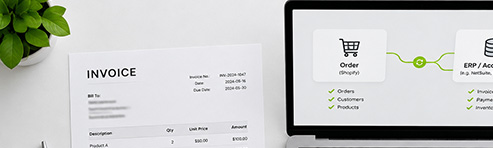 Shopify doesn't generate invoices with the numbering and legal requirements Spanish regulations demand. Invoicing is handled in the ERP or in a connected invoicing tool, and what we integrate is the order handover with all the data that invoicing needs.
Many integrations are solved with Shopify's own tools: Admin API, webhooks, and for specific business logic, Shopify Functions. When the ERP has its own rules that don't fit that model (internal approvals, customer-by-customer negotiated rates, specific invoicing processes), the answer is a custom distribution app, built for your store and not going through the App Store. Deciding between an existing app, Shopify's native tools or a custom build is the part of the work that saves the most money in the long run. An agency that only installs apps will always recommend an app.
Should your ecommerce already be talking to your ERP?
Tell us what system you use, what information needs to travel and how often. We'll tell you what's solved with Shopify's native tools and what needs custom development, before we start.