

If you manage a Magento 2 or Adobe Commerce store, you know the data is there: orders, products, customers, coupons, returns. The problem is that Magento's native reports aren't designed for business decision-making. They're slow, rigid, and for any moderately complex query you end up depending on a developer or exporting to Excel.
Xmetria is the solution we built at Way2ecommerce to solve exactly that problem. A dedicated analytics platform, installed on an independent server, that syncs your Magento data and presents it in fast, visual, easy-to-understand dashboards — without touching your production store.
What is Xmetria?
Xmetria is an ecommerce analytics tool designed specifically for Magento 2 or Adobe Commerce. Unlike a plugin that adds heavy queries to your production database, Xmetria works on a completely independent layer:
- A small module (
W2e_Xmetria) installed in your Magento exports data via direct CSV streams. - Xmetria syncs them into its own database, with no impact on the store.
- Your team accesses the dashboards from any device, in seconds.
The result is professional analytics without slowing down your Magento, without weeks of implementation, and without needing a developer for every query.
Why Xmetria and not Google Analytics or a generic BI tool
This is the most common question. The answer is simple: Google Analytics measures web traffic, not business. It doesn't know what a configurable product is, it doesn't understand the EAV attribute system, it can't tell the difference between canceled orders and net sales, and it has no idea about your MSI inventory with multiple physical warehouses.
A generic BI tool like Power BI or Tableau can do all of that, but it requires weeks of data modeling and a technical person who understands Magento's internal structure. Most teams don't have that luxury.
Xmetria speaks Magento's language from day one:
- Understands configurable products and their simple variants.
- Reads EAV attributes and converts them into dynamic filters and groupings.
- Handles multiple websites, store groups, and store views.
- Supports MSI inventory with breakdown by physical warehouse.
- Excludes configurable order statuses (canceled, closed, processing...).
No prior modeling. No manual ETL. No waiting.
9 specialized analytics modules
Xmetria includes nine modules designed to cover the most frequent queries from ecommerce, marketing, and management teams:
1. Sales Comparison
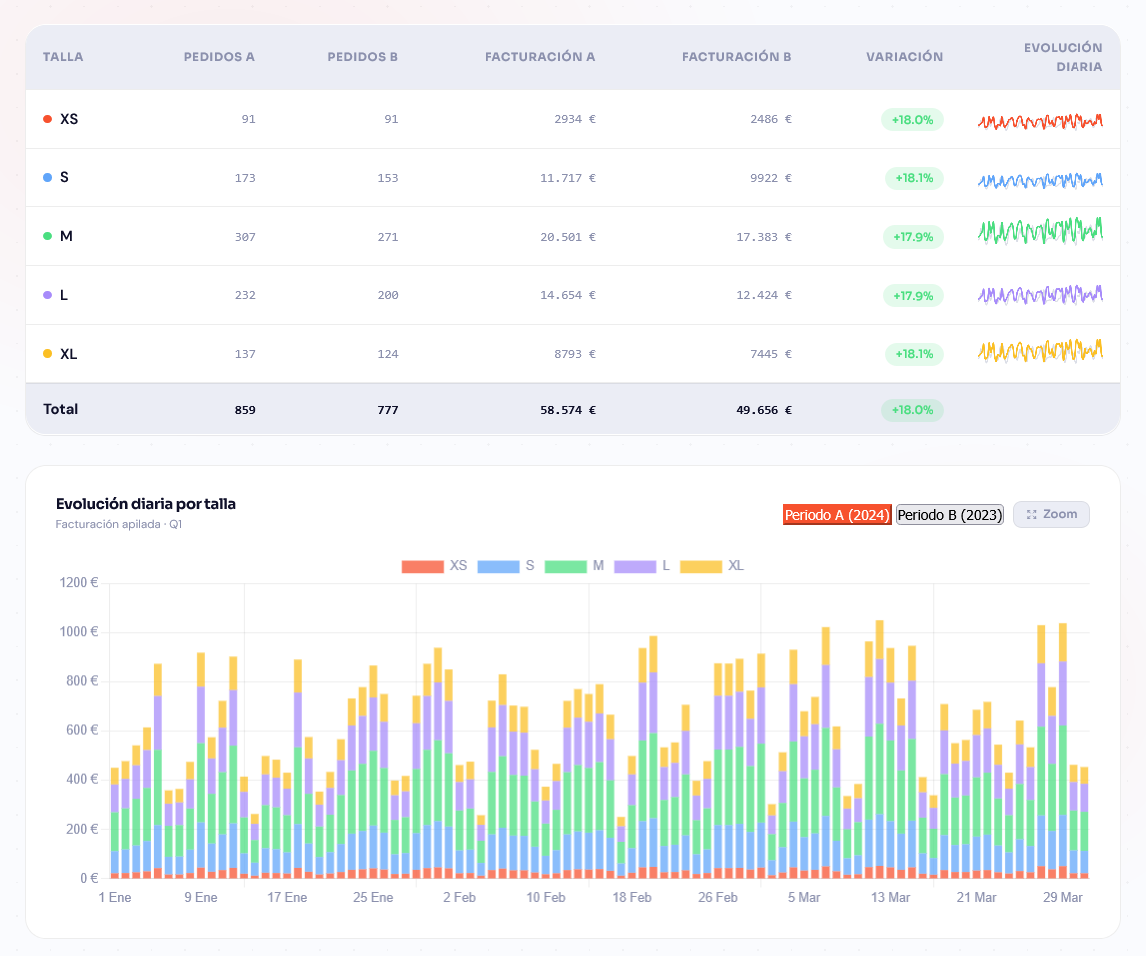
Compare two time periods: net sales, number of orders, and average order value, with percentage variation. Filter by date range, website or store, and group results by any EAV attribute in your catalog (collection, brand, season, color, format, size, flavor...). Includes daily trend charts to visualize patterns at a glance, and CSV export to share the analysis with your team or include it in external reports. Ideal for measuring the real impact of campaigns, detecting seasonality, and backing purchasing decisions with objective data.
2. Best Sellers
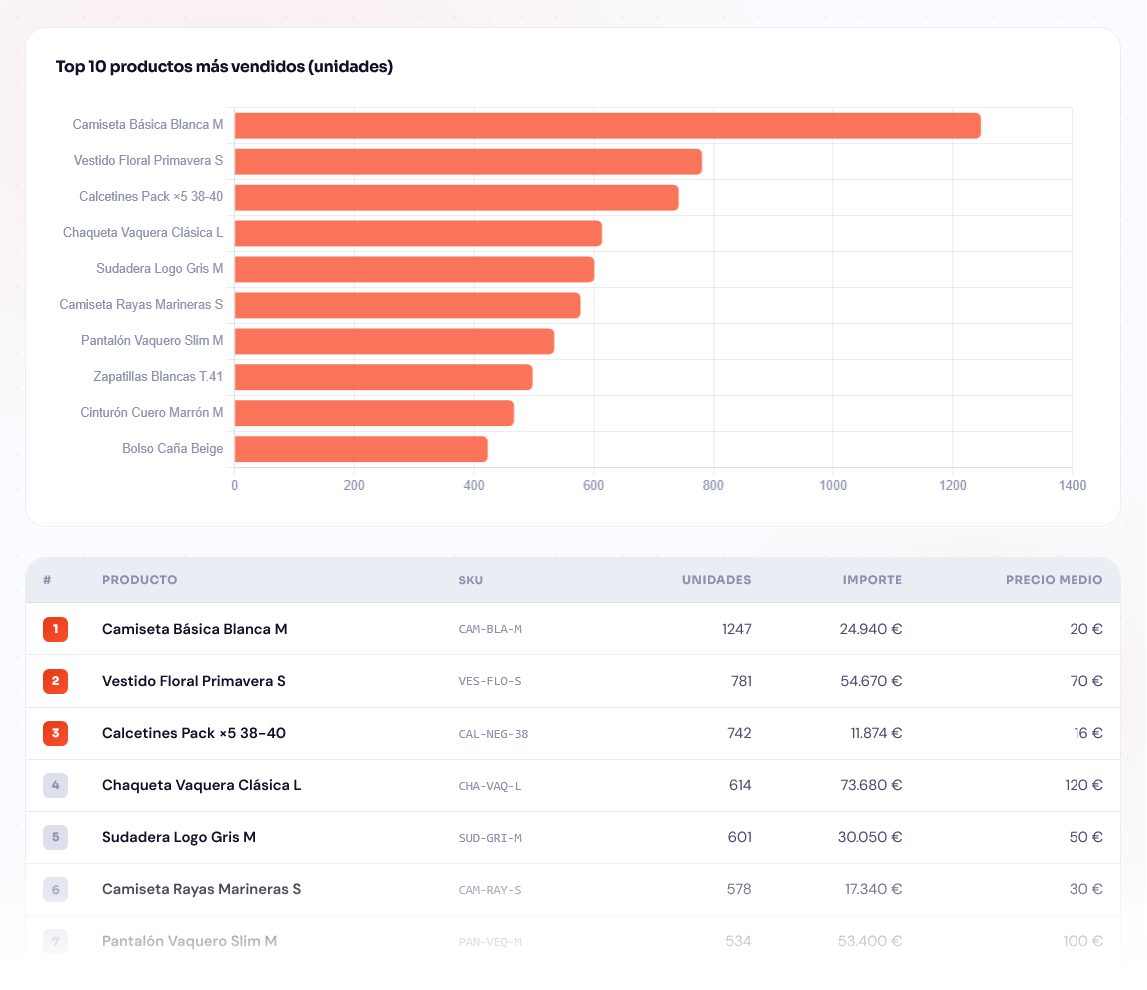
Ranking of best-selling products by units or by revenue, with variant breakdown for configurable products. Cross-filtered by EAV attribute to identify which SKUs drive sales within each category, collection, or season. Select any date range and compare with the previous period to detect demand shifts before they affect stock. Export the full list as CSV to feed your purchasing planning or prioritize marketing actions.
3. Dormant Products
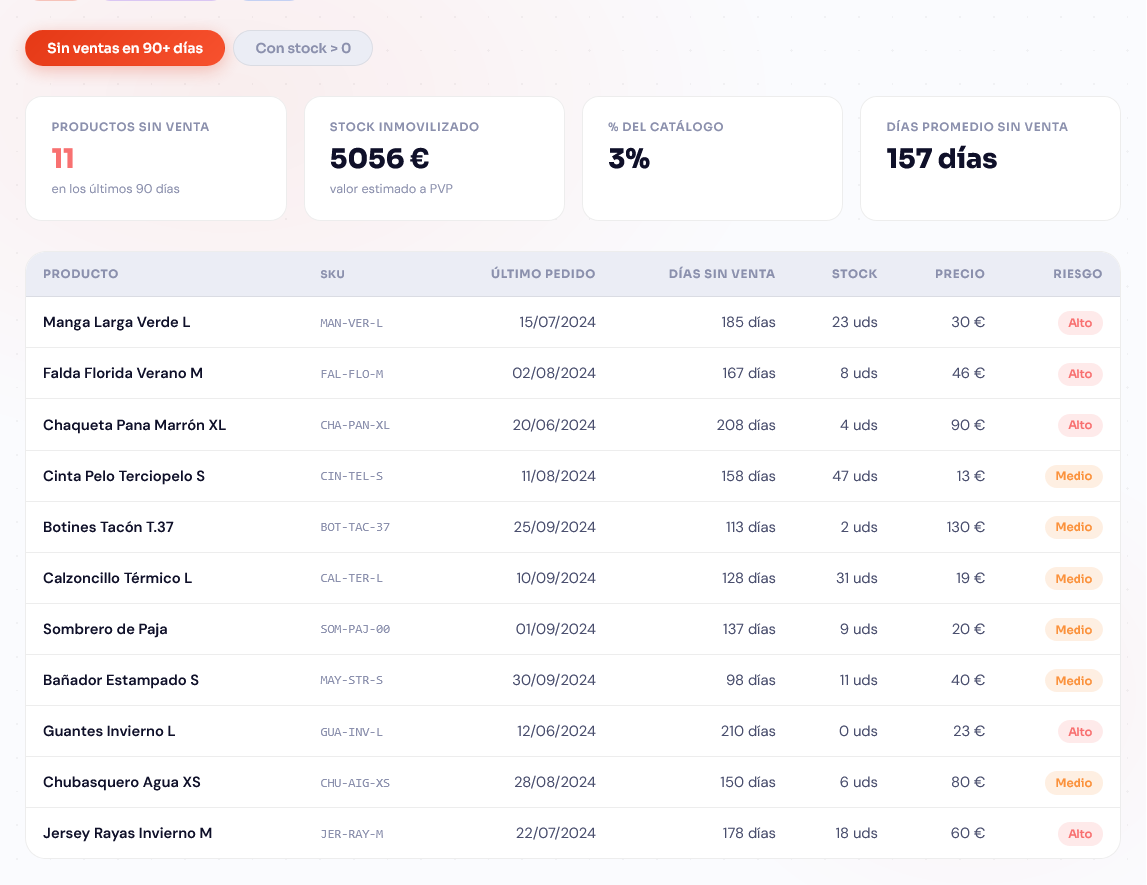
Detect active products that have generated no sales in the selected period. Identify locked-up stock, obsolete SKUs, and liquidation opportunities before the problem worsens and hurts inventory profitability. Filter by category, brand, or any EAV attribute to narrow the analysis to the product families you're most concerned about. An essential tool for keeping your catalog operational, clean, and aligned with real demand.
4. Pre-Stockout Alert
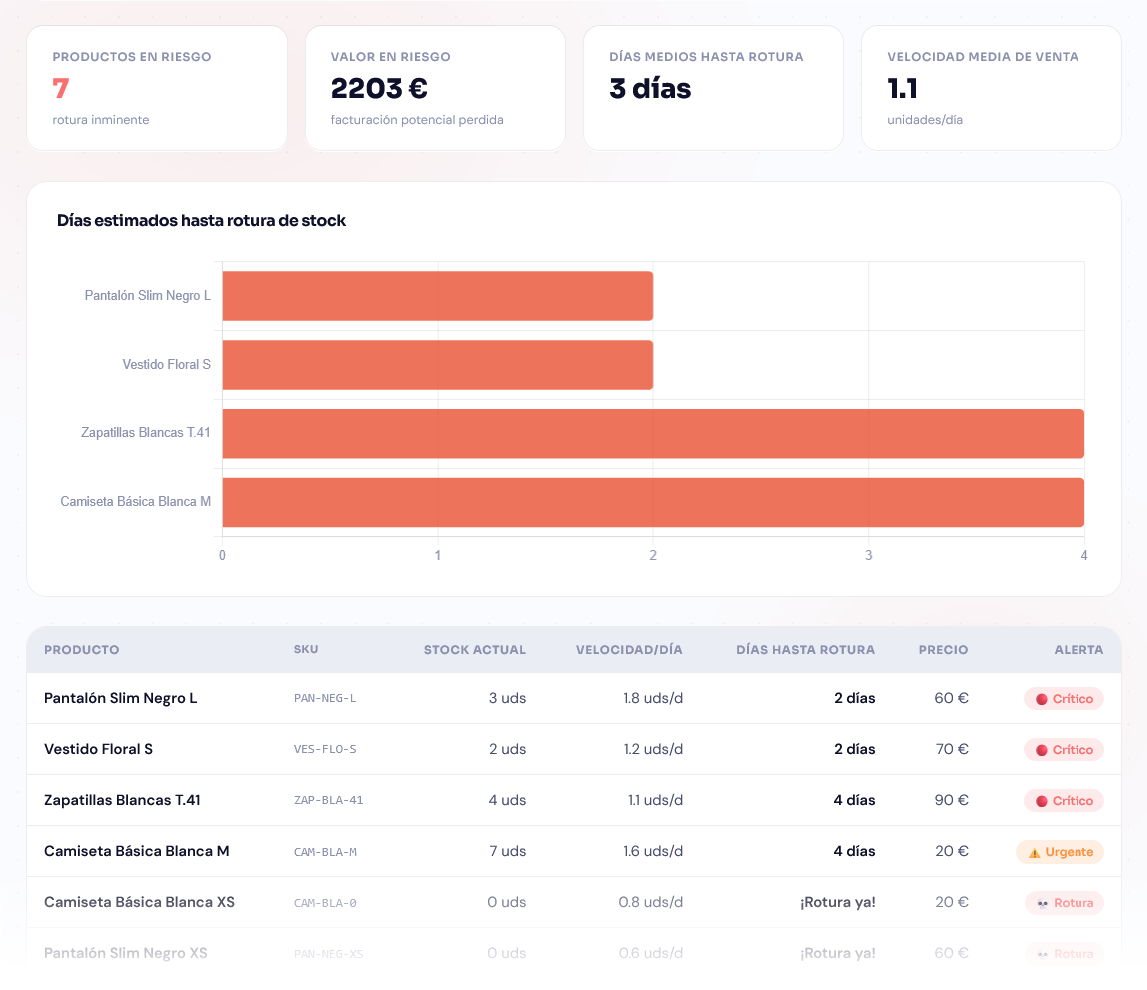
List of products below the configured stock threshold, sorted by sales velocity to prioritize the most urgent replenishments. Includes MSI physical warehouse breakdown to know exactly where the problem is, without manually cross-referencing reports. Set the minimum unit threshold to match your replenishment cadence and get a clear view of at-risk SKUs. Act before stockout, not after: avoid lost sales and the ranking penalty that comes with showing an out-of-stock product.
5. Data Quality
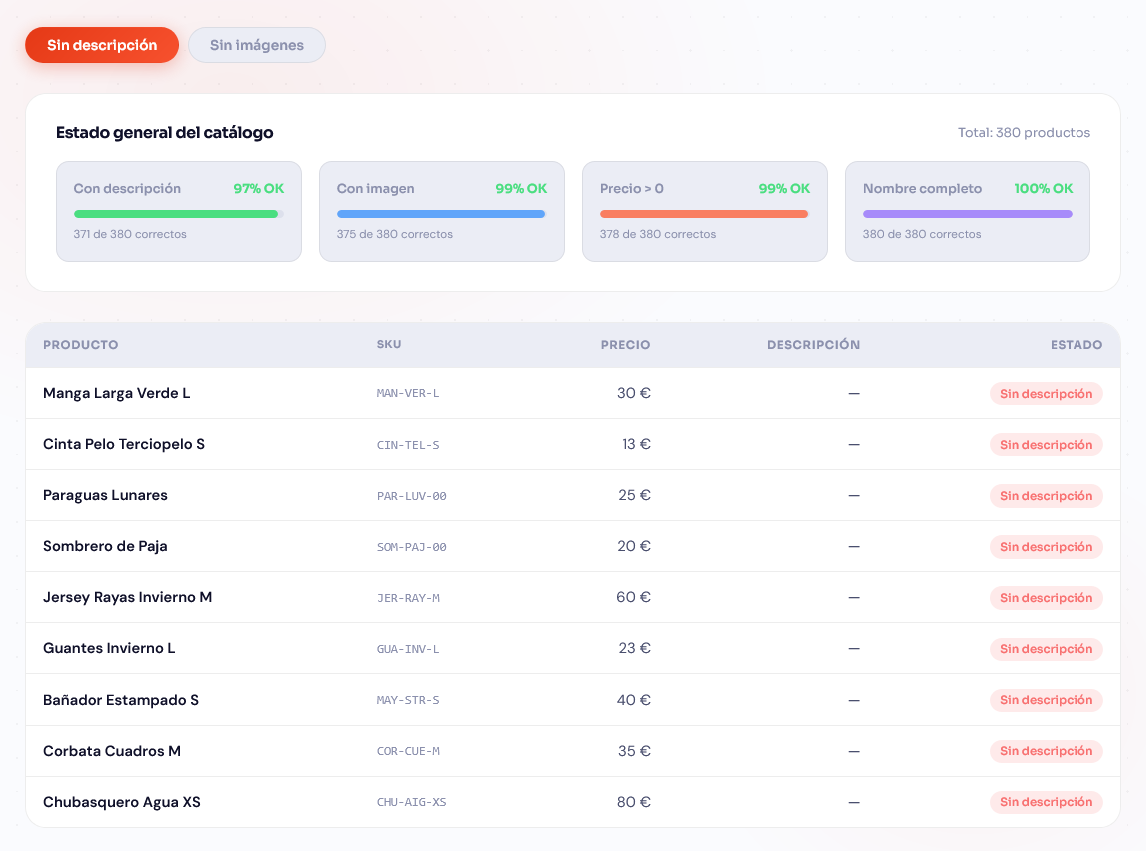
Automatic catalog audit: products without a price, without an image, configurable products without active variants, duplicate SKUs, and other common issues that degrade the shopping experience. Generates a global quality score and detailed tables by issue type to prioritize fixes with clear criteria. Filter by website or category to focus effort on the most critical sections or those closest to a campaign. Essential before any marketplace export, indexing process, or advertising launch that depends on catalog integrity.
6. Order Statistics
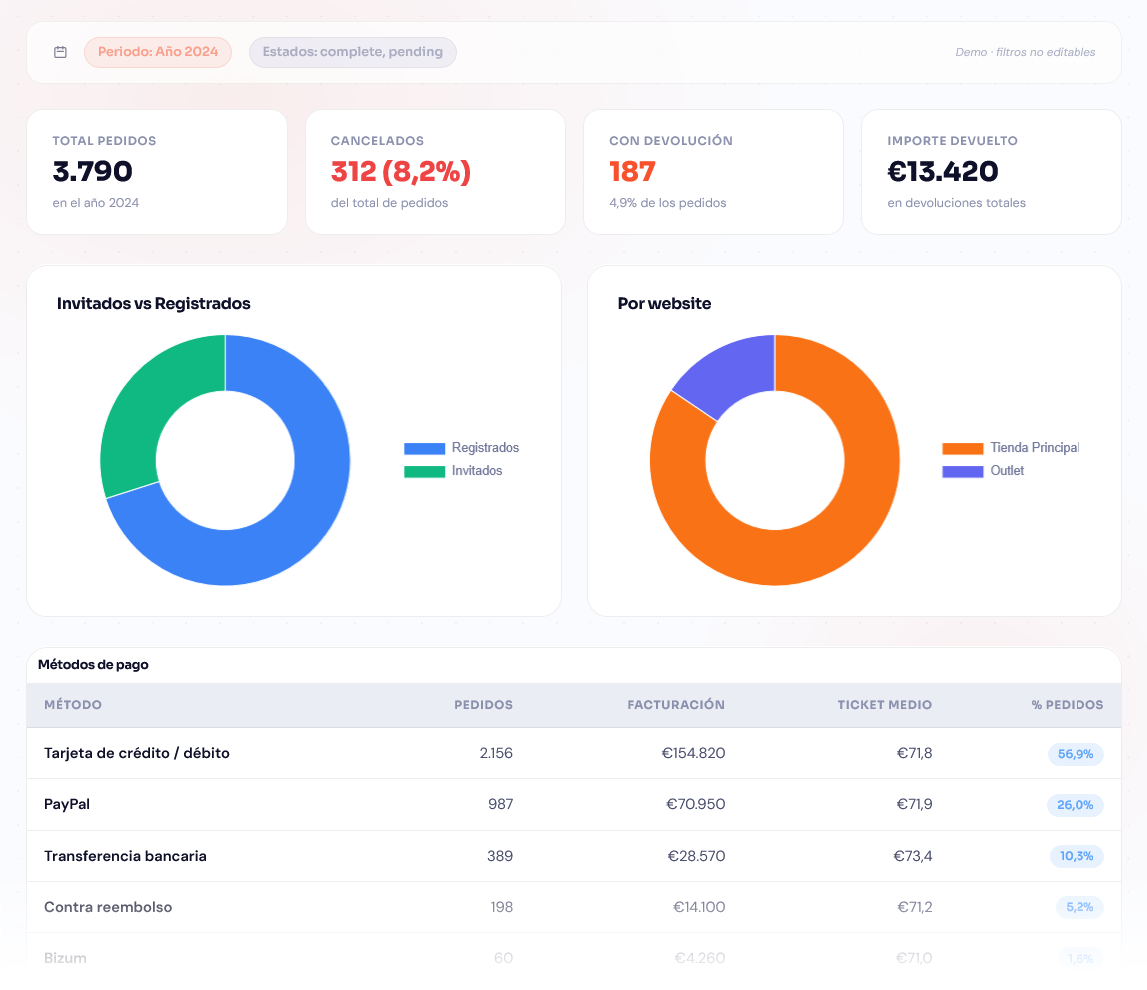
Distribution of orders by payment method, shipping method, customer group, and billing country — all in a single panel. Includes an interactive world map visualizing order volume and revenue by country to spot emerging markets at a glance. Analyze the monthly evolution of each payment or shipping channel to identify shifts in purchasing behavior and negotiate better rates with your logistics providers. Useful for international expansion decisions, payment method adjustments, and shipping strategy optimization.
7. Recurring Customers
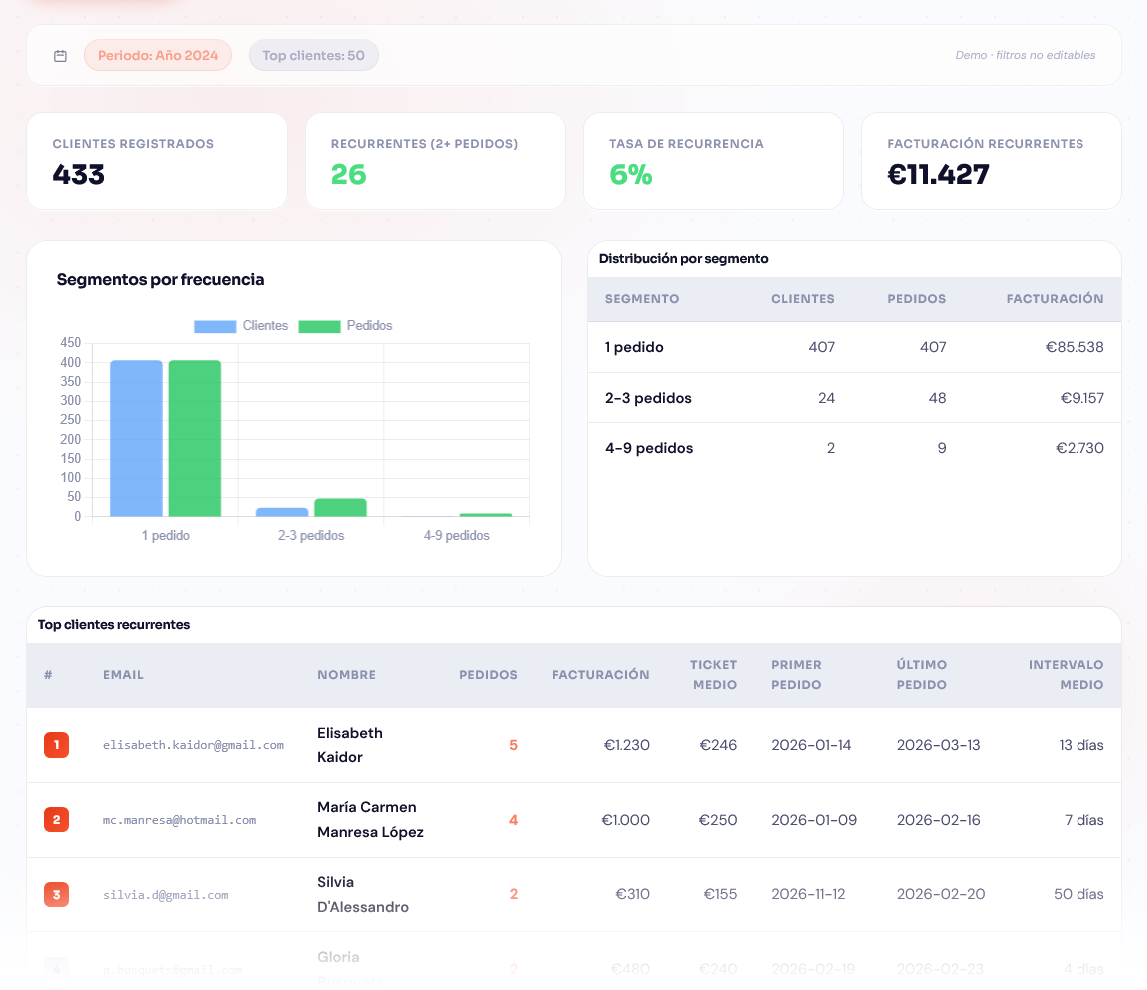
Customer ranking by number of orders and total accumulated revenue, with average order value and purchase frequency indicators for each profile. Segmentation by loyalty tiers and analysis of which product categories concentrate repeat purchases, so you can personalize the offer for each segment. Identify your most valuable customers before launching retention, reactivation, or loyalty programs to maximize their effectiveness. A solid foundation for designing personalized communications and VIP strategies that increase the lifetime value of your customer base.
8. Coupons
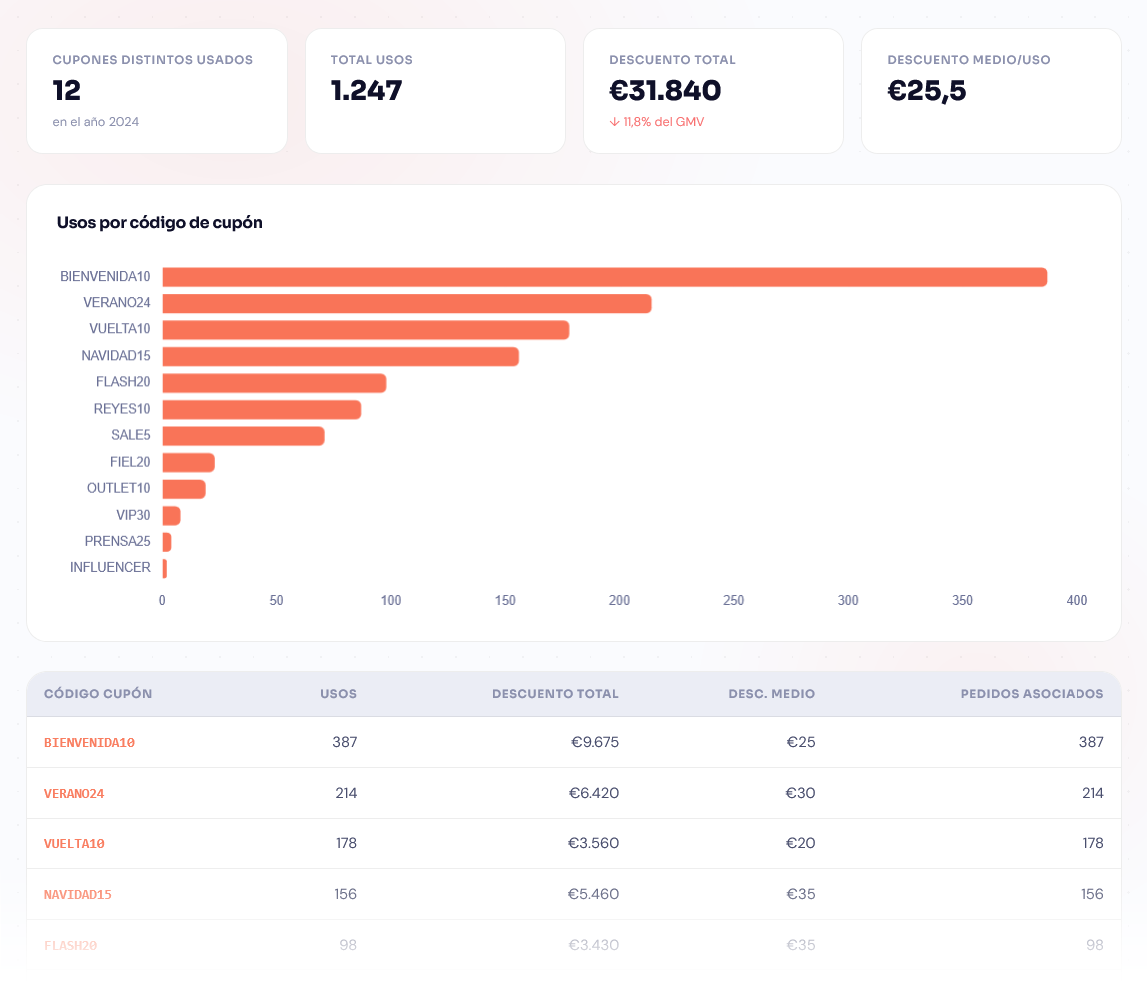
Performance of each coupon: total uses, accumulated discount, and average order value with coupon vs. without coupon to evaluate the real impact on margin. Top 10 most-used codes and a full ranking table with the total cost of each promotion. Filter by date range to measure specific campaigns — Black Friday, sales, cart recovery — and compare their effectiveness across periods. Adjust your discount strategy based on data rather than intuition: know exactly what each coupon costs you and whether it truly increases order value.
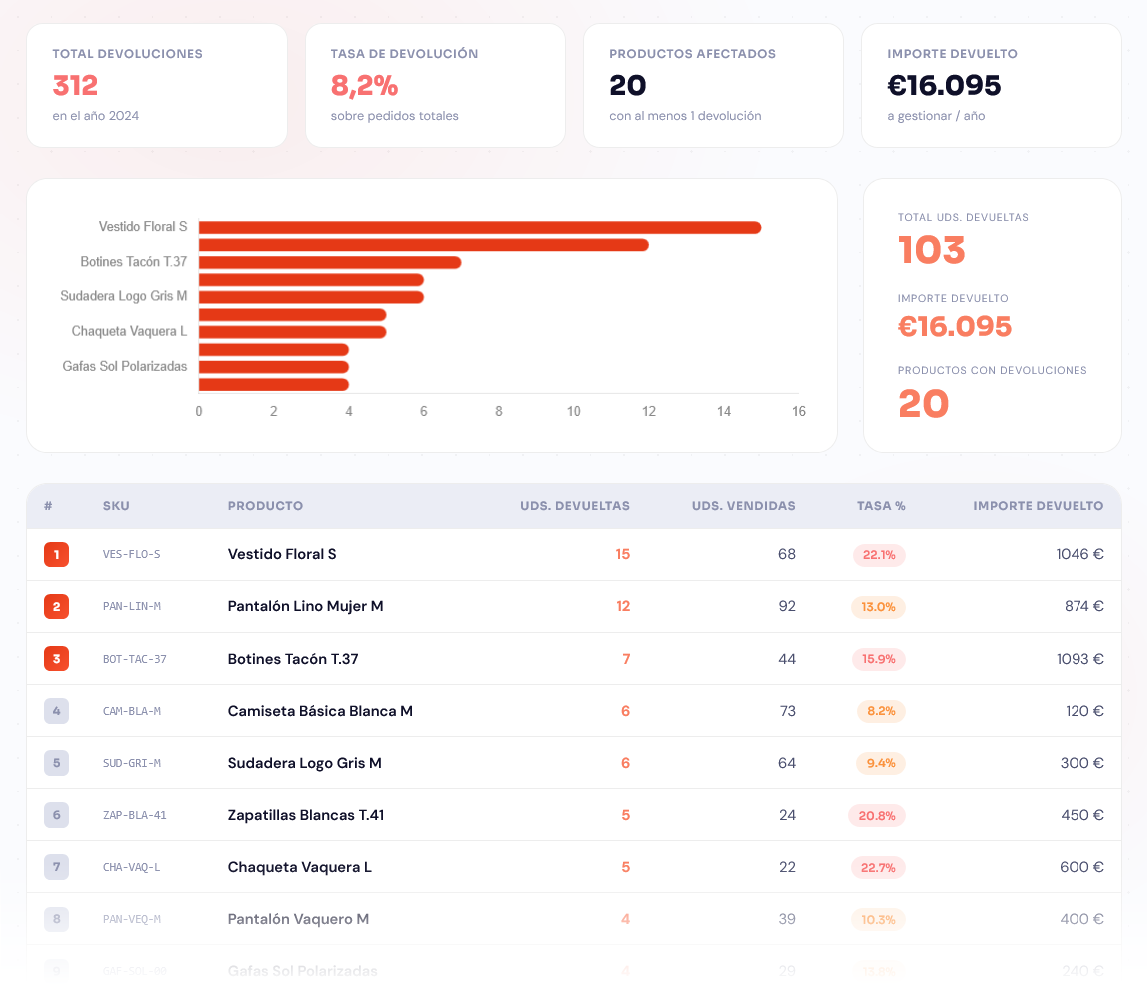
9. Returns (new module)
Product ranking by return volume or return rate on sales in the selected period. Detect quality issues, incorrect descriptions, or unmet expectations before they escalate and damage the store's reputation. Includes variant breakdown for configurable products, so you can identify whether the problem lies in a specific size, color, or material rather than the whole product. Reduce the return rate and protect margins by acting on root causes with precise data.
Differential Technical Features
Xmetria has been built with an architecture designed for high performance and security, ensuring that data exploitation does not compromise your business operations.
Zero Impact on Your Magento
All analytical queries run on Xmetria's own database, not on your store's. Your production Magento doesn't notice the difference, eliminating any risk of slowdowns during traffic spikes.
Dedicated Installation per Client
Each client has their own Xmetria instance. Data is never mixed with other stores in shared databases. Total privacy, enhanced security, and absolute control over your information.
Ultra-Fast Synchronization
The W2e_Xmetria module exports data via direct CSV streams, avoiding the heavy queries of conventional REST API. A catalog of 80,000 products syncs in approximately 3 minutes.
Dynamic Filters and Groupings
Filters are built automatically from your Magento's real EAV attributes. No manual configuration: if your catalog has "collection" or "material", Xmetria displays them directly as filtering options.
Multi-Website and Multi-Stock (MSI)
Compatible with complex Magento installations: multiple websites, store groups, store views, and inventory with multiple physical sources (MSI) distributed geographically.
Role-Based Access Control
We assign each user exactly the modules they need. Marketing accesses sales; logistics manages stock; management oversees global KPIs. Granular roles for an efficient team.
Printable and Exportable Reports
Clean and optimized print layout, eliminating visual noise. Prepare your reports for team meetings or results presentations with a single click directly from the dashboard.
Dark Mode and Responsive
Modern interface that automatically detects your system's dark mode preference. 100% responsive design so you can check your sales from your phone or tablet anywhere.
How does it get up and running?
Xmetria's deployment is straightforward and requires no changes to your Magento core:
- Magento module installation: We install
W2e_Xmetriain your Magento 2. It does not modify any core files. - Xmetria configuration: We deploy your Xmetria instance on an independent server and configure the connection to your Magento (URL, API token, sync frequency).
- First synchronization: Xmetria imports the historical data of products, orders, and customers. For large catalogs, the full process takes approximately 3 minutes.
- Team access: We create the users, assign permissions by module, and your team can start querying the dashboards from day one.
Frequently asked questions
Does Xmetria work with Adobe Commerce (Magento Enterprise)?
Yes. Xmetria is compatible with Magento 2 Open Source or Adobe Commerce, including cloud and on-premise installations.
What if I already have Google Analytics or a BI tool?
Xmetria doesn't replace GA — it complements it. GA gives you traffic and behavior data; Xmetria gives you business data (real sales, stock, catalog, customers). If you have a BI tool, Xmetria can work as a pre-modeled, ready-to-consume data source.
Is the data secure?
Yes. Each client has their own isolated instance. Data is never mixed with other clients'. The connection between Magento and Xmetria uses an encrypted API token.
How long until it's up and running?
In most cases, between 1 and 2 business days from the moment server and Magento access is confirmed.
Do I need ongoing technical maintenance?
No. Once configured, Xmetria syncs automatically according to the configured frequency. The Way2ecommerce team handles platform maintenance.
Ready to see your Magento through fresh eyes?
If your team makes decisions based on Excel exports or Magento's native reports, you're leaving value on the table. Xmetria puts the right data in front of the right people, at the moment they need it.
Write to us and we'll show you how it works with your store's real data.